
Verifying your ID
Before you can start using your Hardblock account, you need to complete the ID verification process.
After you have registered your email address and confirmed it by following the email we send you and setting a password, your account will be created.
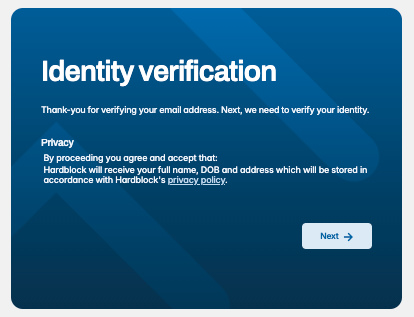
You will then be asked to provide your full name, date of birth and address. Be sure to check that the details you enter are correct, as on the next page you will be adding your ID document details. If there is a mismatch you may be unable to proceed.
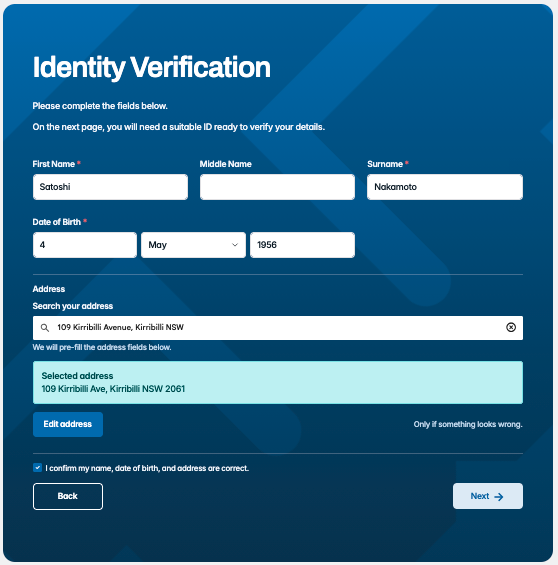
Following this, you'll then enter your ID document details. You can use the following document types:
Driver's License (all states & territories), passport, visa document, citizenship certificate, ImmiCard, Medicare Card, Centrelink card or Australian Birth certificate.
Here's what a Driver's License page looks like:
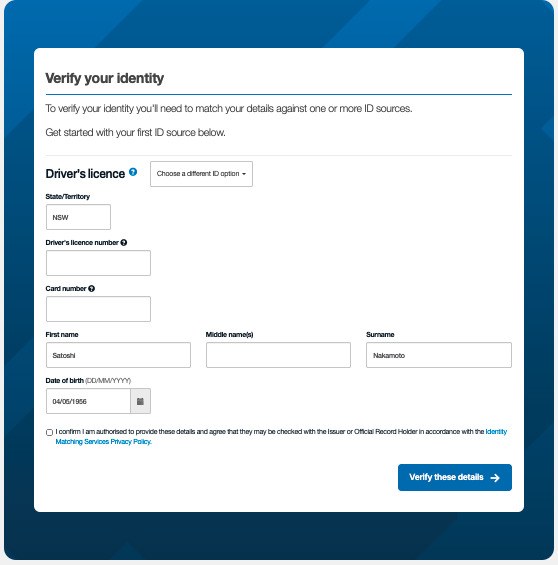
In some cases, you'll be asked to add a second document.
In rare cases, your verification will go to a 'pending' state that requires our team to review and approve your verification. This will usually take no longer than 1 working day.
Once verified, you'll arrive at your account dashboard. Once you've added your phone number and verified it, you'll be able to visit your deposit details page and make your first deposit!
If you get stuck with any of the above, please reach out to support and we'd be happy to help.